

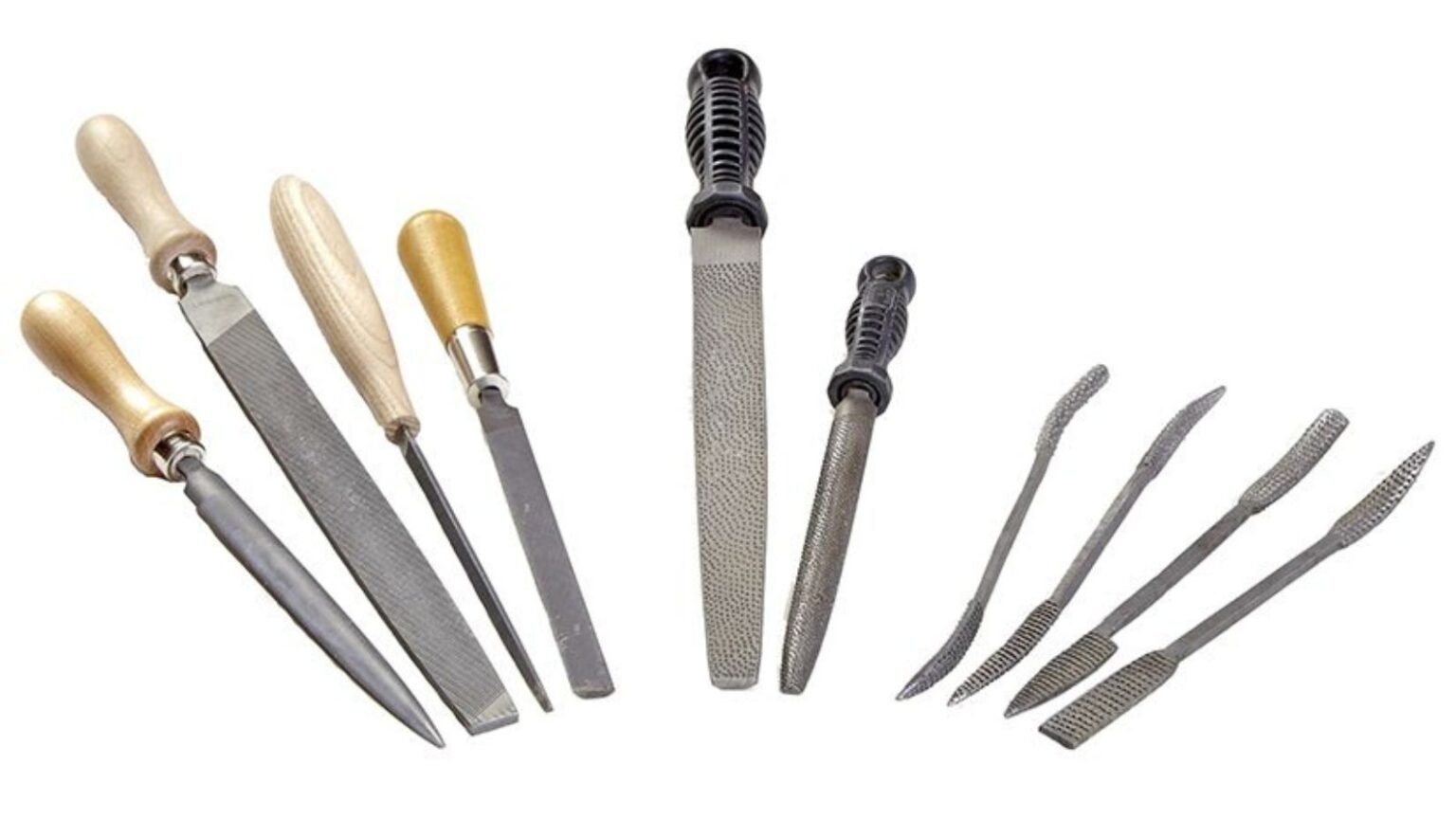
Files are essential hand tools used in woodworking, metalworking, and other DIY or professional projects. Selecting the correct file ensures efficiency, precision, and safety. Two of the most common types are wood files and metal files, each designed for specific materials and tasks. This article explores their differences, applications, and tips to help you choose the right file for your project.
Introduction to Files
A file is a hand tool with a hardened steel surface covered in tiny teeth. It is used to shape, smooth, or remove material from workpieces. Files vary by shape, tooth pattern, and material hardness. Understanding the differences between wood and metal files is key to achieving accurate and smooth results.
What is a Wood File?
A wood file, also known as a rasp, is specifically designed for shaping and smoothing wood. Its teeth are coarse and widely spaced, allowing it to remove large amounts of wood quickly without clogging. Wood files are ideal for tasks like carving, fitting joints, and shaping edges.
What is a Metal File?
A metal file is designed for shaping, smoothing, and finishing metal surfaces. It has finer, closely spaced teeth to remove small amounts of metal with precision. Metal files come in various grades, such as single-cut or double-cut, and are used for tasks like deburring, fitting metal parts, and sharpening tools.
Physical Differences Between Wood Files and Metal Files
| Feature | Wood File | Metal File |
| Teeth | Coarse, widely spaced | Fine, closely spaced |
| Material Removal | Fast, removes large amounts | Precise, removes small amounts |
| Surface | Usually curved or flat rasps | Flat, round, or half-round |
| Clogging | Rare | Can clog easily with soft metals |
| Recommended Use | Wood, soft materials | Metal, hard materials |
These differences ensure each file performs efficiently for its intended material.
Types of Wood Files
Wood files come in several types, including:
- Flat rasps for general shaping
- Round rasps for concave surfaces
- Half-round rasps for curved and flat surfaces
- Specialty carving rasps for detailed work
Each type provides control and efficiency for woodworking projects.
Types of Metal Files
Metal files vary depending on their cut and shape:
- Single-cut files for smoothing and finishing
- Double-cut files for faster material removal
- Needle files for precision and delicate work
- Bastard, second-cut, and smooth files for progressive finishing
Choosing the right type depends on the metal and the desired result.
Durability and Maintenance
Wood files are less prone to wear if used on wood but can become dull on hard materials. Metal files are hardened to handle metals but require cleaning to prevent clogging. Proper maintenance includes brushing teeth with a file card and storing in a dry environment to prevent rust.
Ease of Use
Wood files are easier to use for beginners because they remove material quickly and show immediate results. Metal files require more skill and patience, especially on hard metals. Using the correct technique—consistent pressure and angle—is essential for smooth results.
Applications: When to Use Wood Files
Wood files are ideal for:
- Shaping wooden furniture and decorative pieces
- Smoothing rough edges on cut lumber
- Carving and creating curves or contours
- Fitting joints in woodworking projects
Applications: When to Use Metal Files
Metal files are suitable for:
- Removing burrs from metal parts
- Smoothing welds or rough edges
- Sharpening tools and knives
- Precision fitting of metal components
Pros and Cons of Wood Files
Pros:
- Fast material removal
- Easy to use on soft and medium-hard woods
- Durable for woodworking projects
Cons:
- Not suitable for metals
- Coarse teeth can leave scratches if not finished properly
Pros and Cons of Metal Files
Pros:
- Precise and versatile for metals
- Available in multiple shapes and cuts
- Can handle harder materials than wood files
Cons:
- Slower material removal
- Can clog with soft metals
- Requires skill for smooth results
Choosing the Right File for Your Project
When deciding between a wood file and a metal file, consider:
- Material type (wood or metal)
- Desired finish (rough shaping or smooth precision)
- Project size and complexity
- Your experience and comfort with hand tools
Using the correct file ensures efficiency, safety, and a high-quality result.
FAQs About Wood and Metal Files
Q1: Can I use a wood file on metal?
A: No, wood files are too coarse and can become damaged or ineffective on metal.
Q2: Can metal files be used on wood?
A: They can, but material removal will be slower and may leave scratches compared to a wood file.
Q3: How do I clean a clogged metal file?
A: Use a file card or wire brush to remove debris from the teeth.
Q4: Are rasps the same as wood files?
A: Yes, rasps are a type of wood file with coarse, individually raised teeth.
Q5: How should files be stored?
A: Store files in a dry place, separate from other tools, to prevent teeth damage and rust.
Conclusion
Both wood files and metal files serve important purposes in shaping and finishing materials. Wood files are perfect for woodworking projects where fast material removal is needed, while metal files provide precision and durability for metalworking. By understanding the differences, types, and proper applications, you can select the right file to achieve professional results and make your projects more efficient and accurate.